



 Home Home
 More info More info
 Download Download
 Online Help Online Help
 Order Order
 Contacts Contacts
|

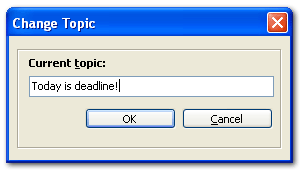
What's a topic?Overview'Topic' field can be useful to define your current conversation subject. You can change the conversation topic easily. How do I change it?To change the topic, simply press [CTRL] + [T] or select the 'Change topic' item from the context menu. The 'Change Topic' window will appear:
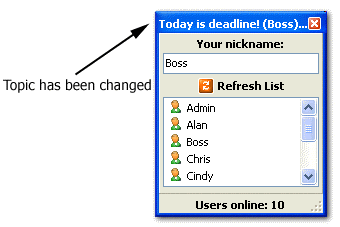
Type the new topic and press 'OK' button. The PopMessenger header will change and will look like the one shown in picture below:
As you can see, header text consists from topic text and nickname of the user who changed the topic.
|
|
||||||||||||||||||||||||||||||||||||||||||||||||||||||||||||||
 Help Contents